Kyocera · Color Multifunction

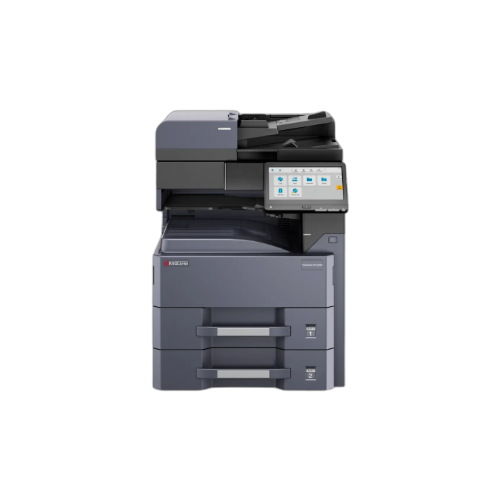
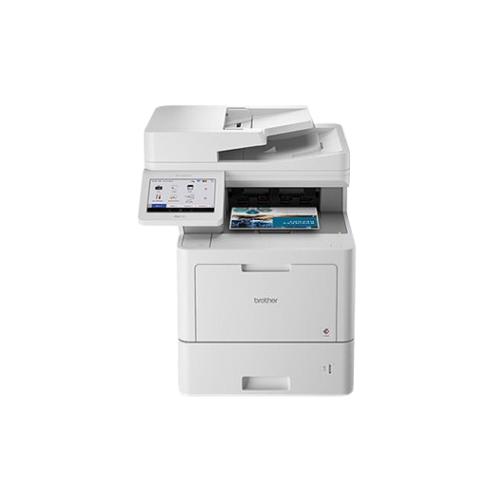
Kyocera TASKalfa MZ2501ci

The Kyocera TASKalfa MZ2501ci is an A3 color MFP that delivers 25 ppm printing, a 10.1‑inch color touchscreen, and an optional 320‑sheet dual‑scan document processor, all within a 125,000‑page monthly duty cycle.

Print speed
25 ppm color
Display
10.1 inches
ADF Feeder
320 sheets pages
Connectivity
Ethernet · USB · Wi-Fi
Free delivery 24-hr quote turnaround Authorized Kyocera reseller Lease or buy outright
In stock
Kyocera 855ST00543
Authorized Kyocera reseller Free shipping to 50 states Standard manufacturer warranty Install guidance by phone 30-day return policy
Is this the right printer for you?

Who the Kyocera TASKalfa MZ2501ci is actually for

Most equipment pages just tell you what a device does. Here's the honest version: when this machine is the right choice, when it's fine, and when you should look at something else. We offer equipment for every business need, but the right machine depends on your specific workflow.

Best fit

Pick this if...

  • You run a mid‑sized creative team that regularly prints A3 marketing materials and needs a high‑throughput, color MFP that can handle up to 125,000 pages a month.
  • You require a 10.1‑inch, color touchscreen interface for quick job setup, plus an optional 320‑sheet dual‑scan document processor to keep multi‑page batches moving.
  • You want integrated cloud and AI‑enabled scanning that can deliver documents to Google Drive, OneDrive, or Office 365 without extra software.
  • You're comfortable with a 12‑x‑18 tabloid/A3 paper size and need a machine that can also run banners up to 12‑x‑48.
  • You value a quick 18‑second warm‑up and robust 480‑W printing power for reliable 25‑ppm performance.
Works fine

You'll be happy if...

  • You print three‑ to 10‑thousand pages a month and will accept a single‑band Wi‑Fi connection if you run the unit via a wired Ethernet network.
  • You need A3 output but a lower color volume; the machine’s 125 k page duty cycle will keep up, though the price of full‑color toner sets may be higher than a monochrome MFP.
  • You want simple scanning to email or network folders; the onboard document processor is optional, so you can keep costs down if you rarely need batch scans.
Look elsewhere

Skip this if...

  • You print fewer than 2,000 pages a month — the color toner sets cost more than a monochrome MFP and the machine’s power draw is high.
  • You need stapling or finishing on the same chassis – the MZ2501ci lacks built‑in stapler or cup feeder, so you’ll need an external finisher.
  • You require high‑speed, >30 ppm output for rapid volume work; the 25 ppm speed will be a bottleneck.
  • You need full‑color offsets or large‑format printing beyond 12‑x‑48 banner; the machine is capped at 12‑x‑18 legal/A3.
Full specifications

Every spec, no guessing

The Kyocera TASKalfa MZ2501ci is an A3 color multifunction printer designed for busy offices that need rapid, high‑volume production. With 25 ppm black‑and‑white and color printing, a 10.1‑inch color touch screen, and an optional 320‑sheet dual‑scan document processor, it satisfies the demands of marketing and design teams. Worth knowing before you buy: the unit runs at a 125,000‑page monthly duty cycle, holds 1,150 sheets of standard paper (expandable to 7,150), and can handle legal and banner sizes up to 12‑x‑48 inches. Its 18‑second warm‑up and 480‑W print power deliver consistent speed and reliability, while the 40 W ready mode and 0.4 W sleep mode keep energy usage moderate. The MZ2501ci adds integrated cloud and AI‑enabled scanning that sends documents to Google Drive, OneDrive, or Office 365 directly. Optional fax, robust connectivity, and a versatile document processor make it a flexible choice for a wide range of business workflows.
Print
Print technology Multifunction
Print speed (mono) Up to 25 pages per minute
Duplex printing
First page out < 18 seconds or less
Copy & Scan
Capability Color Multifunction
Paper & Media
Paper size A3/Tabloid
Automatic document feeder 320 sheets pages
Max monthly duty cycle 125,000 pages
Connectivity
Wired Gigabit Ethernet (10/100/1000)
USB High-Speed USB Interface (Host / Device)
Wireless Wi-Fi 802.11b/g/n/ac/ax
Display 10.1 inches
Physical & power
Form factor No data
Usage class No data
Manufacturer Kyocera
Model 855ST00543
How you can buy this printer

Buy it, lease it, or just reorder supplies

Three ways to get this printer, each priced to match how you actually use it. Most small offices lease because toner and maintenance are bundled. If you know what you need, buy outright. If you already own one, just reorder supplies.

Buy outright
One-time payment · yours to keep
Custom quote
Free delivery · Full warranty
  • Machine is yours the day it arrives
  • Starter toner supply included
  • Standard Kyocera manufacturer warranty
  • Install help by phone or remote session
  • Order your own toner when the starter runs out
Request purchase quote →
Supplies only
Already own one? Just reorder.
Request pricing
Genuine OEM Supplies & Consumables
  • Genuine OEM toner cartridges designed for this model
  • Replacement drum units and maintenance kits
  • Certified high-yield or standard capacity options
  • Free shipping on qualifying orders
  • Auto-reorder option so you never run out mid-job
Order supplies →

Final lease rate depends on term length, credit profile, and bundled supplies. Outright purchase and supplies pricing varies with bundled warranty, install packages, and order volume. Request a quote for exact pricing.

Included with every order

What ships with the Kyocera TASKalfa MZ2501ci

The printer itself

Kyocera TASKalfa MZ2501ci in original Kyocera packaging. , roughly 602 x 665 x 790 mm

Starter toner

Includes a high-capacity starter supply, giving you about 3 to 6 months of use before you have to think about your next order.

Setup documentation

Kyocera quick-start guide, power cord, connectivity cables, and setup resources.

Setup call (if you want it)

Book a 20-minute setup call with our team. We'll walk through network configuration and onboarding.

Supplies & consumables

Genuine OEM Supplies for the Kyocera TASKalfa MZ2501ci

Need replacement toner or parts for your Kyocera 855ST00543? We supply certified genuine OEM consumables to keep your machine printing at peak performance and ensure your manufacturer warranty remains fully protected.

Whether you require standard-yield cartridges for light printing, high-yield options for a lower cost-per-page, or replacement drum units, we carry the full lineup of compatible supplies for this model.

If you lease this printer through us, toner and drum are included. You never pay for supplies separately. That's usually the better deal once you add up real costs over 3 years.

Standard Toner

Standard-Capacity Toner

Standard OEM toner cartridge, best for offices with lower monthly print volumes.

Quote
each
High-Yield Toner

High-Capacity Toner BEST VALUE

High-yield OEM toner cartridge, delivering a lower cost-per-page for active offices.

Quote
each
Drum / Kit

Drum Unit / Maintenance Kit

OEM-certified replacement components to restore original print quality and reliability.

Quote
each
Request Supplies & Toner Pricing →
Free quote · no obligation

Get a quote on the Kyocera TASKalfa MZ2501ci

Tell us how you want to pay (outright, lease, or supplies only) and what volume you run. You'll get a line-item quote back within one business day, from a specialist who actually works on these machines, not a general sales rep.

  • Real pricing, no runaround. Upfront monthly lease rate or outright price, plus shipping and any install add-ons itemized.
  • One business day turnaround. Quotes land in your inbox within 24 hours. Often faster.
  • No credit pull until you say yes. We don't ping your credit to give you a quote. Only if you sign.
  • Volume & bundled supplies. Tell us your monthly print volume and we'll price toner bundling so you don't get surprised.

Ready to put this printer to work?

Request a free, no-obligation quote on the Kyocera TASKalfa MZ2501ci. Lease, buy outright, or just order supplies. Quote in your inbox within one business day. Or call and talk to a specialist right now.

Get my free quote Or call (888) 574-5120